MS Reporting Services Report Viewer Control printing errors with IE8 and Vista
We use SQL Server 2008's Reporting Services for all of our site's reports here at work.
Along with that we also use Microsoft's Report Viewer control which gives you the ability to serve up the RDL files that are stored in SQL Server.
One of the features that the control offers is the ability to print your reports.
To accomplsih this it uses Active-X, which we all know can be funky and a hassle to troubleshoot when it's not working properly.
When we released our new system back in February we got most of our users printing with minimal support.
We encouraged all of them to upgrade to IE 7 (many were still using IE6) which did fine with the control.
Shortly after our launch Microsoft started rolling out IE8 and our users slowly started upgrading.
That's when we found many of them having issues printing.
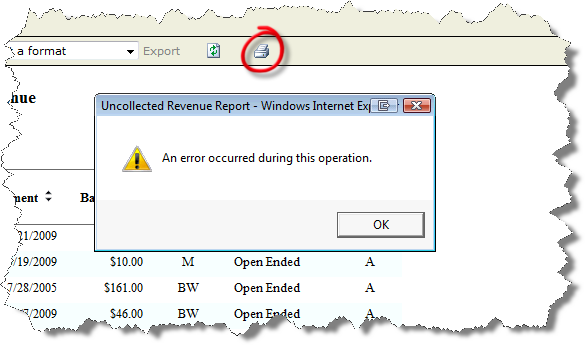
As you'll see in this screen shot, they would simply get a generic error when clicking the print button, even after successfully installing the print control.
As a work around we were having folks export to PDF and then print from there.
Obviously this wasn't an ideal solution and we started troubleshooting to figure out what the problem was.
After doing some testing on our end on virtual machines we were able to reproduce the problem and narrowed it down to Windows Vista running IE8.
Since we weren't able to resolve the problem on our virtual machine configuration with anything we tried we eventually opened a support ticket with Microsoft.
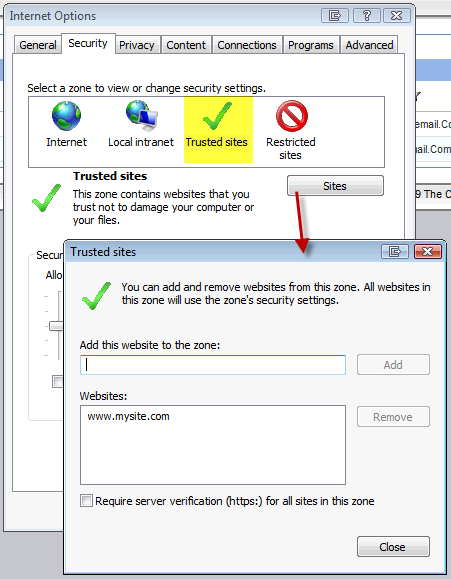
After some support calls with Microsoft they informed us that in order for this to work properly you have to add the site that's using the report viewer control as a trusted site if you're using Internet Explorer 8 and Windows Vista.
We thought this was odd because we definitely had tried this on our virtual machine setup and didn't have any luck.
What we found out on our own later was that as that this solution does not seem to help if you originally started out with a Beta or RC (Release Candidate) copy of IE8 that had been upgraded to the final release.
That was the scenario we had on our virtual machine that we were using to test IE8 and even the trusted site fix didn't help in that scenario.
So, if you are having this problem and you're using a clean install of IE8 or an upgrade to the final release of IE8 from a previous version adding the trusted site to fix this problem is easy.
Just open up IE and click Tools > Internet Options and follow the steps shown here in the screen shot to add your site as a trusted site:
Restart your browser and you're in business. Now if they could only get away from Active-X so our users that decide not to use IE can print.